Update on Windows 22H2 Update
July 3, 2023MIS has changed the delivery method of the Windows 22H2 Update based on inconsistency of direct delivery from Microsoft.
A direct deployment method was enacted June 28 to begin pushing to securely connected devices (e.g. onsite ethernet, AOVPN, EAHEALTH Wi-Fi). Download speed will be dependent on connection speed and bandwidth limits. All other connection types will be addressed by MIS individually.
Below is a typical installation experience. Some experiences may be different based on your current windows version.
The update will automatically download in the background of the impacted devices having minimal impact on performance. After the download is complete, each device will receive a pop-up reminder every 12 hours until the update is installed.
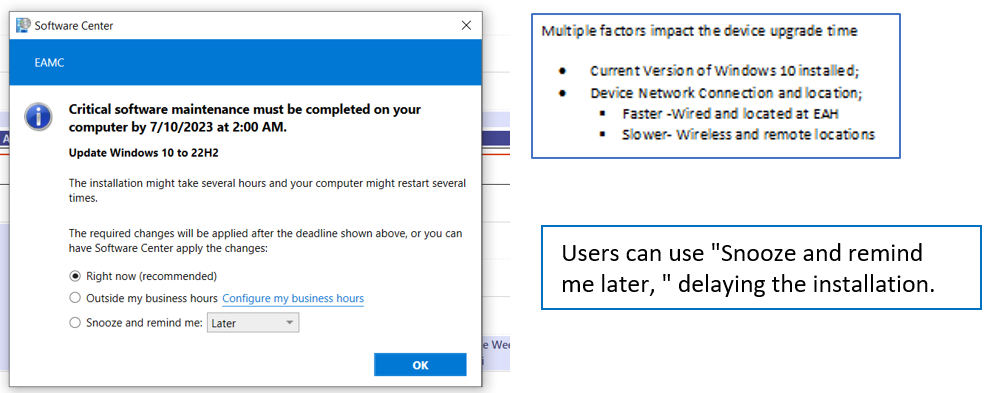
At 2 a.m. on July 18, all devices that have not accepted the update will be forced to install and restart. This has been extended from the original date of July 10.
MIS recommends accepting this upgrade as early as possible as it is critical not to wait until the last minute.
Please work with your department managers to schedule the update procedure. Proper coordination will ensure continuity of patient care and business services.
Other suggestions for planning to complete the upgrade:
- Save all work and close open applications before accepting the upgrade.
- Restart the device when leaving for the day or taking an extended break.
- Restart the device when a patient room or work area is unused.
- Designate a device reboot schedule for busy areas with multiple devices and inform staff of unavailability.
For any issues regarding the upgrade, please contact the Help Desk @ 334.528.6850 or open a self-service ticket: Help Desk Self-Service in EAMC Managed Favorites in Chrome or Edge browsers.